Predator CNC Editor™ Software

With over 1,500 CNC programmer job openings in the U.S., maximizing their time is essential to boosting manufacturing productivity and efficiency.
What is Predator CNC Editor?
Predator CNC Editor is the industry’s most widely used CNC code editor, trusted by manufacturers of all sizes—from small job shops to large-scale operations. Designed to boost daily productivity, it offers hundreds of powerful features that streamline CNC programming, editing, and machine tool operations. Despite its robust capabilities, it remains intuitive and easy to use. Available in four editions to meet your specific needs:
- Predator CNC Editor Enterprise™
- Predator CNC Editor™
- Predator CNC Editor Express™
- Predator CNC Editor Light™ - FREE! Edition - Download - Installation Steps
Why use Predator CNC Editor?
- CNC Intelligent Editing with Undo and Redo
- Machining Wizards
- Unlimited File Size
- File Compare
- DNC Send, Receive and Dripfeed
- 3D Backplotting and Verification
- CNC Templates
- 11 International Languages
- Online Help
- Flexible Licensing and Purchasing
- Made in the USA - Learn more
CNC Intelligent Editing with Undo and Redo
Enhance your CNC programming workflow with Predator CNC Editor—featuring dozens of intelligent G-code editing commands for fast, accurate program modifications. Make quick changes with full undo and redo capabilities, ensuring error-free CNC code editing. Designed for CNC programmers, machinists, and operators, the user-friendly interface includes Microsoft® Word-style menus, toolbars, and shortcut keys, making it easy to learn and adopt. Whether you're optimizing NC code, editing part programs, or managing G-code files, Predator CNC Editor improves productivity in every machine shop.
Accelerate CNC Machining with Built-In Wizards for Common G-Code Edits
Predator CNC Editor features a suite of specialized CNC machining wizards designed to streamline and automate common G-code editing tasks. These powerful tools help CNC programmers and machine operators make fast, accurate changes, improving efficiency across your CNC operations. Multiple wizards are included for the following:
- Blockskips
- Bolt Hole Circle
- Comments
- DNC Restart
- Drill Position
- Math Operations and Expressions
- Feed rate calculator and override
- Spindle speed calculator and override
- Sequence Numbers
- Triangle
Edit Large G-Code Files and Multiple CNC Programs with Ease
Predator CNC Editor supports CNC programs up to 64 MB in size, making it ideal for handling large G-code files used in complex machining operations. Easily edit multiple CNC programs simultaneously with advanced cut, copy, and paste functionality—streamlining workflow for CNC programmers and machinists working across various projects.
Compare and Merge G-Code Files with Integrated CNC File Comparison
Predator CNC Editor features a powerful side-by-side G-code file compare tool that highlights every G-code and M-code difference between CNC programs. With a single click, users can automatically resolve discrepancies—streamlining the process of updating master CNC programs with shop floor edits. Flexible options allow you to ignore feed rates, spindle speeds, tool changes, spaces, and blank lines, while a detailed comparison report ensures accuracy in CNC code integration.
Reliable DNC Communication and Drip-Feeding for CNC Machines
Predator CNC Editor enables you to send, receive, and drip-feed G-code programs to one CNC machine at a time using either a direct serial connection or a switch box. Compatible with a wide range of CNC controllers, it runs seamlessly in the background while other applications are active. In the event of a tool break, the built-in DNC Restart feature allows you to quickly regenerate the CNC program from any specific point—minimizing downtime and maximizing machining efficiency.
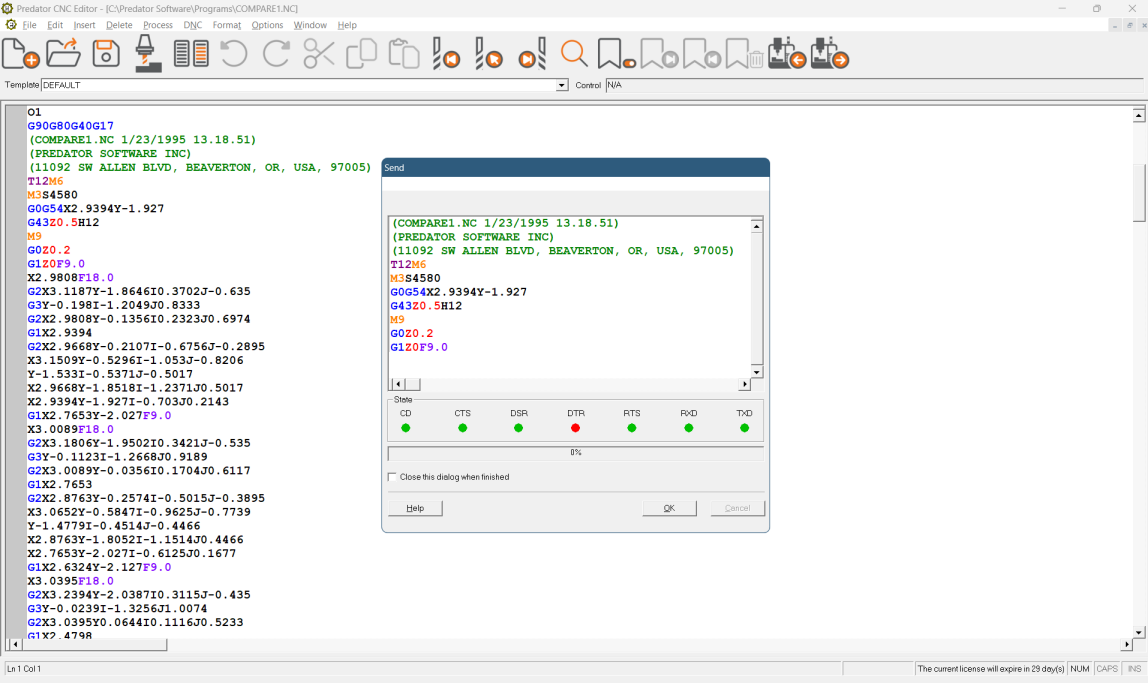
NOTE: An upgrade to Predator DNC provides support for DNC networking of multiple CNC machines at the same time, comprehensive Ethernet, special RS232 protocols, conversational protocols, binary file transfers and BTR executive transfers.
3D Backplotting and Verification of your CNC G-Code
Predator CNC Editor and Predator CNC Editor Enterprise bundle an entry level of Predator Virtual CNC to graphically verify CNC G-Code. Visualize your CNC programs in 3D by quickly backplotting any CNC program. Define stock and tool shapes to provide 3D animation and verification. Supports 2 and 3 axis mills, routers, waterjets, lasers and 2 Axis lathes. Within the graphics window zoom in, zoom out, pan and fit commands provide complete control of the process. Copy the backplot or 3D animation to the clipboard and quickly add graphics to your setup sheets.
NOTE: Numerous examples are provided. For best results, 3D backplotting and verification may require appropriate machine configuration and reverse post processor configuration which can be done by knowledgeable end users, Predator Resellers or Predator Software Inc. Extensive online help is provided for machine configuration and reverse post processor configuration.
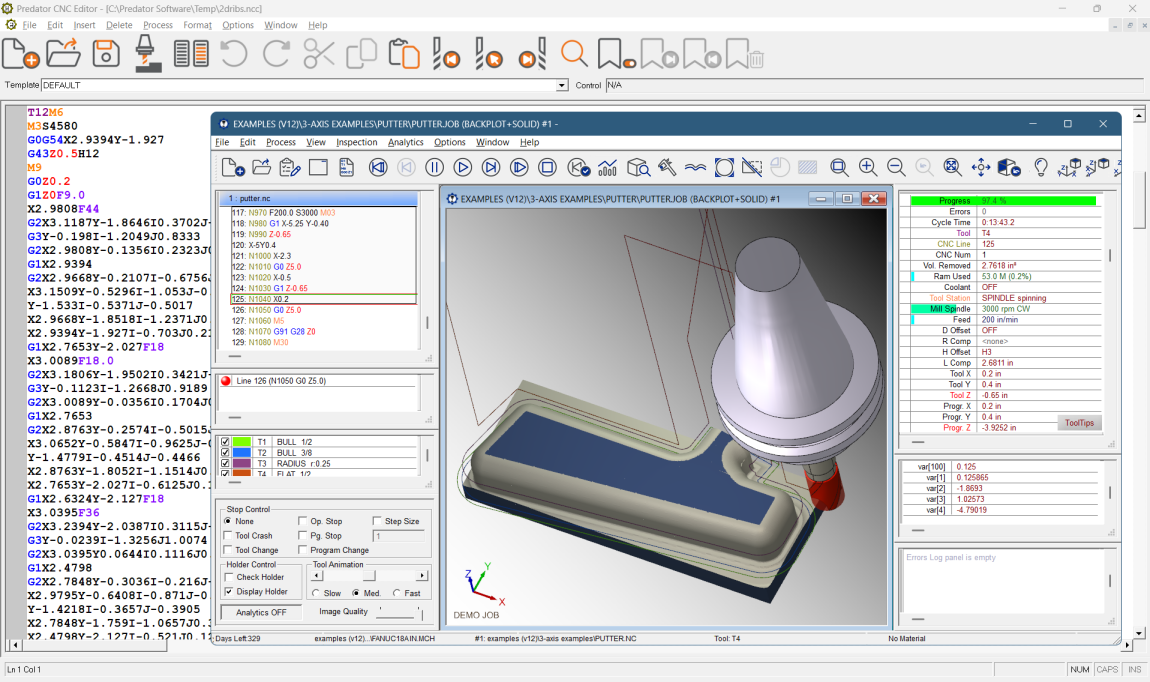
NOTE: Backplotting and verification of 4 and 5 axis mills and mill/turn lathes all require an upgrade to our full Predator Virtual CNC product provides support for advanced 4 and 5 axis CNC verification, machine simulation, inspection, analytics, CNC program optimization and much more.
G-Code Backplotting Support
Backplot an extensive range of G-Codes, M-Codes, CNC variables, sub programs and CNC macros from every major CNC vendor. Even backplotting APTCL is supported. Get additional details on the following:
- Backplot APTCL details
- Backplot Fagor CNC program details
- Backplot Fanuc CNC program details
- Backplot Haas CNC program details
- Backplot Heidenhain CNC program details
- Backplot Mazak CNC program details
- Backplot Okuma CNC program details
- Backplot Siemens CNC program details
Additional G-Code support is available by customizing existing CNC reverse post processors. Create an unlimited number of CNC reverse posts as required.
Intelligent CNC Programming with Configurable Predator CNC Templates
Predator CNC Editor enhances G-code editing with smart CNC Templates that store and recall all CNC control settings, reducing setup time and programming errors. The software includes a library of 20 preloaded, fully customizable CNC templates compatible with various machine tool controllers. These templates streamline CNC programming, making Predator an ideal solution for precision manufacturing and efficient code management.
Predator Editor CNC Templates add intelligence by remembering all the CNC control details. Includes a library of 20 sample CNC templates. Each CNC template is completely configurable.
Flexible Licensing and Purchasing
Predator CNC Editor software offers flexible licensing options, including per-PC licenses and floating licenses, available as a one-time purchase or an annual subscription. Pricing for Predator CNC Editor software starts at $575 for a perpetual license or $250 per year with Premier Support included in the subscription. Enhance your CNC programs with an Enterprise edition, Predator hardware, client software, as well as implementation, training, and professional services — all available for purchase.
For a custom Predator CNC Editor solution, including system design, implementation details, client licensing, multi-seat discounts, RFID integration, barcoding options, and more — contact our sales team at sales@predator-software.com. Get a comprehensive quote and detailed statement of work designed to fit your manufacturing environment.
Predator CNC Editor Enterprise - Part Numbers
| Part # | Descriptions for Microsoft SQL Server licenses |
|---|---|
| 20161000 | Predator CNC Editor Enterprise Administrator for SQL Server |
| 20161910 | Predator CNC Editor Enterprise Client for SQL Server |
| Part # | Descriptions for Oracle licenses |
| 20181000 | Predator CNC Editor Enterprise Administrator for Oracle |
| 20181910 | Predator CNC Editor Enterprise Client for Oracle |
NOTE: Predator CNC Editor Enterprise licenses do not include licenses for Microsoft SQL Server or Oracle.
Predator CNC Editor - Part Numbers
| Part # | Description |
|---|---|
| 20102001 | Predator CNC Editor |
Predator CNC Editor - Popular Options
| Part # | Description |
|---|---|
| 20209020 | Predator Touch HMI |
| 20303050 | Predator Virtual CNC Express |
| 29900000 | Predator Floating License Manager - Learn more > |
Predator CNC Editor Express - Part Numbers
| Part # | Description |
|---|---|
| 20103001 | Predator CNC Editor Express |